Overview: The Spreadsheet Agent Era Begins
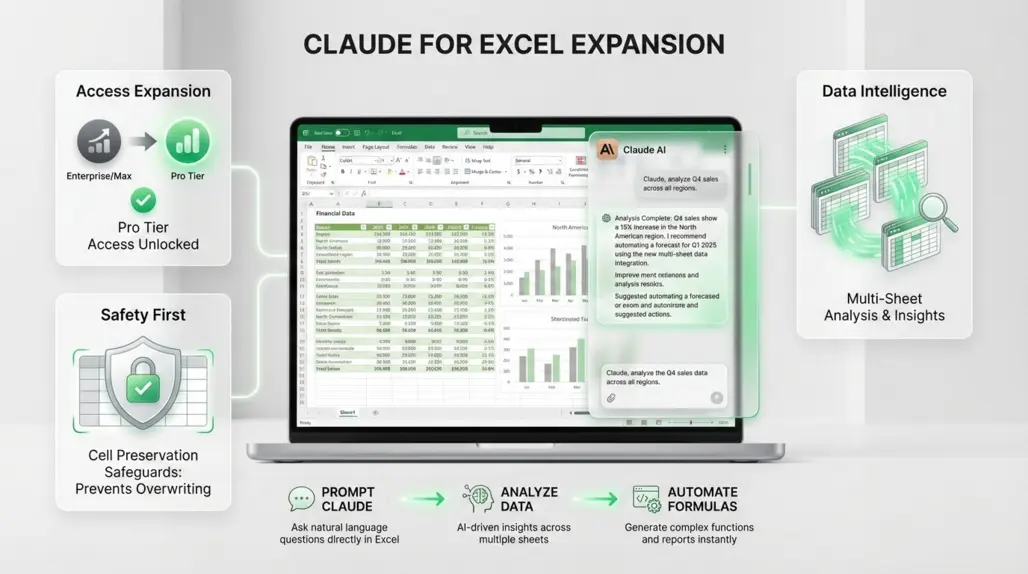
Anthropic has officially expanded access to its Claude for Excel integration, moving the tool beyond its initial Enterprise and Max-tier exclusivity. As of this week, Pro-tier subscribers can now integrate Claude's reasoning capabilities directly into Microsoft Excel workflows.
For builders and founders, this marks a significant shift in how data analysis is handled. While AI coding assistants like Cursor and Windsurf have transformed software development, the "spreadsheet layer" of business—financial modeling, growth metrics, and raw data analysis—has largely remained a manual or formula-heavy process. This update bridges that gap, bringing agentic behavior to the world's most popular data tool.
Key Features for Power Users
The integration operates as a sophisticated sidebar assistant, distinct from simple formula generators. It is designed to handle complex context, making it particularly useful for developers dealing with CSV dumps, log analysis, or operational metrics through AI data analytics solutions.
1. Multi-Spreadsheet Context
One of the standout technical capabilities is the ability to ingest multiple workbooks simultaneously. Users can drag and drop several files into the context window, allowing the model to cross-reference data between different sheets. This is critical for founders comparing monthly run rates across different fiscal years or developers analyzing performance logs exported into separate files.
2. Advanced Memory Management
To support heavy analytical sessions, Anthropic has implemented "auto-compaction" techniques in the backend. This allows builders to engage in longer reasoning chains—iterating on data analysis or refining complex queries—without hitting context limits or losing the thread of the conversation.
3. Non-Destructive Editing
For developers accustomed to version control, AI unpredictability in data files is a major risk. The new update includes strict safeguards designed to preserve existing cell content. Claude is engineered to avoid accidentally overwriting hard data, ensuring that the integrity of the original dataset remains intact while generating new insights or columns.
4. Traceability and Citations
Hallucinations are fatal in data analysis. To mitigate this, the tool provides cell-level referencing. When Claude offers an insight or calculation, it cites the specific cells used to generate that output. This allows users to audit the AI's logic instantly—a feature essential for any mission-critical financial or operational reporting. This commitment to reliability aligns with Anthropic's broader quality initiatives, including the release of the Bloom evaluation framework for assessing AI behavior and alignment.
Impact for Builders and Founders
The expansion to Pro users democratizes access to "analyst-grade" AI.
- For Founders: It reduces the dependency on complex Excel wizardry for financial modeling. You can describe the desired outcome (e.g., "Forecast Q3 burn rate based on these three scenarios") and have the AI handle the formulaic heavy lifting. This makes sophisticated AI finance tools accessible to those who may not have deep technical expertise in spreadsheet programming.
- For Developers: It turns Excel into a more viable interface for quick data inspection. Instead of writing a Python script to parse a one-off CSV export, devs can query the data using natural language within Excel, speeding up debugging and data validation processes.
Global Availability and Access
This rollout creates a unified experience for knowledge workers worldwide. By lowering the barrier to entry from Enterprise to Pro, Anthropic is positioning Claude not just as a chatbot, but as an integrated workspace layer. The tool is currently in beta, reflecting a continuous iteration cycle based on user feedback regarding latency and reasoning depth.
As the lines between coding environments and general business tools blur, the ability to script, analyze, and automate directly inside spreadsheets represents the next frontier of productivity for the technical workforce. This Excel integration follows the recent debut of Cowork for Claude on macOS, further demonstrating Anthropic's commitment to embedding AI capabilities directly into existing workflows rather than requiring users to switch between isolated tools.
Discover more cutting-edge AI tools and applications on Appse, your comprehensive directory for the latest AI innovations across data analytics, development, finance, and beyond.